Most escalations don’t fail because the issue is too complex. They fail because the context doesn’t travel with the ticket.
The ticket moves to the next team. The conversation thread stays behind. The receiving agent reconstructs what happened from a two-line description, makes assumptions, and the customer ends up repeating themselves.
That’s not a training problem. It’s a structural one. And it shows up the same way every time: resolution times that stretch, coordination that migrates to Slack, and CSAT scores that erode on tickets that were ultimately resolved — because how the escalation was handled matters as much as whether the issue was fixed.
This piece walks through where escalations break down and what the infrastructure needs to look like at each stage.
Table of Contents
- The infrastructure problem behind every bad escalation
- What actually transfers when a ticket escalates
- Sentiment shifts across every conversation. Most agents miss it.
- The ticket reaches the right agent, but the account risk signals don't
- Getting engineering or product involved means leaving the support tool
- Cross-team collaboration requires configuration that most teams never finish
- The metrics that tell you whether your escalation process is actually working
- The best escalation is the one the customer never notices
The infrastructure problem behind every bad escalation

Why does escalation break down with support teams
The problem isn’t that support teams aren’t communicating. It’s that structure they’re communicating through wasn’t designed for tickets that move across teams, channels, and tools.
This breakdown happens at the same two points:
- Context doesn’t travel with the ticket. The receiving agent gets a status and a description, not the full conversation, the account history, or the internal discussion that happened before the handoff.
- Coordination moves outside the support system. When teams need to loop in engineering or get a quick sign-off, the default is a Slack message — which means the decision trail lives outside the ticket and is invisible to anyone who picks it up later.
What actually transfers when a ticket escalates
When a ticket moves from Tier 1 to Tier 2, or from support to engineering, the receiving agent typically gets three things: a ticket number, a status, and whatever the first agent had time to type into the description box at the moment of handoff.
Everything else — the internal discussion, the workaround that was already tried, the customer’s exact words — gets lost during the handoff.
Account-level context doesn’t move either. Health scores, renewal timelines, whether this is the third escalation this quarter from the same account — none of it transfers automatically.
The person picking up the ticket has no way of knowing if they’re dealing with a one-off complaint or a relationship that’s been quietly deteriorating for months. That missing context shapes how they respond, whether they realize it or not.
With Hiver, conversation history and account-level context travel with the ticket. When an agent escalates or @mentions a teammate, the receiving agent gets the complete conversation record, every internal note, and the full account picture pulled from Salesforce or HubSpot, including renewal dates, health scores, and contact history. Every ticket also logs back to the associated CRM record automatically, so account history stays current without anyone updating it manually.
And when agents need to have a quick back-and-forth conversation on Slack, they can easily send a message right from Hiver. The entire conversation history gets logged under the same ticket, so that context gets preserved.
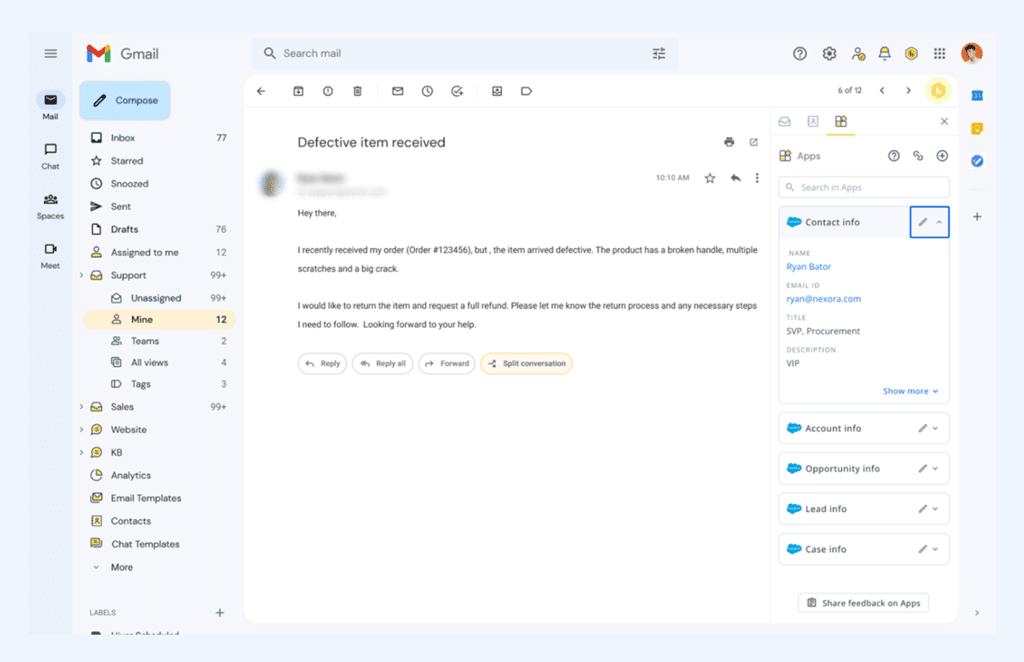

Account-level context and conversation history with Hiver’s integrations
For teams operating at scale, that context layer is what makes cross-team collaboration possible. Egnyte‘s customer success team runs on exactly this — three people supporting nearly 13,000 customers.
Without a system that kept internal coordination attached to the conversation, the default was to jump into Slack, which meant decisions were made outside the ticket and invisible to whoever picked it up next.
Once they moved to Hiver, that changed. As Kenedi Padgett, Manager of Scaled Customer Success at Egnyte, put it: “We love just being able to be in one place instead of them having to go over into Slack or another form of communication to coordinate on queries.”
With Hiver, you can even automate ticket creation. For example, an email containing “bug” or “API error” can automatically create a ticket in Jira with all the info pre-filled. This a) adds structure, b) saves time, and c) improves time to escalation (and resolution).
Sentiment shifts across every conversation. Most agents miss it.
Customer sentiment rarely stays flat across a conversation. A ticket that opens with frustration can look very different three replies in — either because the issue got worse, or because the team handled it well.
Most L2 agents or engineering teams have access only to the most recent message. They have no visibility into how the conversation developed — whether the customer started calm and became progressively more frustrated, or whether things have improved since the first response.
How Hiver fixes this
Hiver’s AI sentiment analysis tracks how a conversation shifts across its full life, not just its current state.
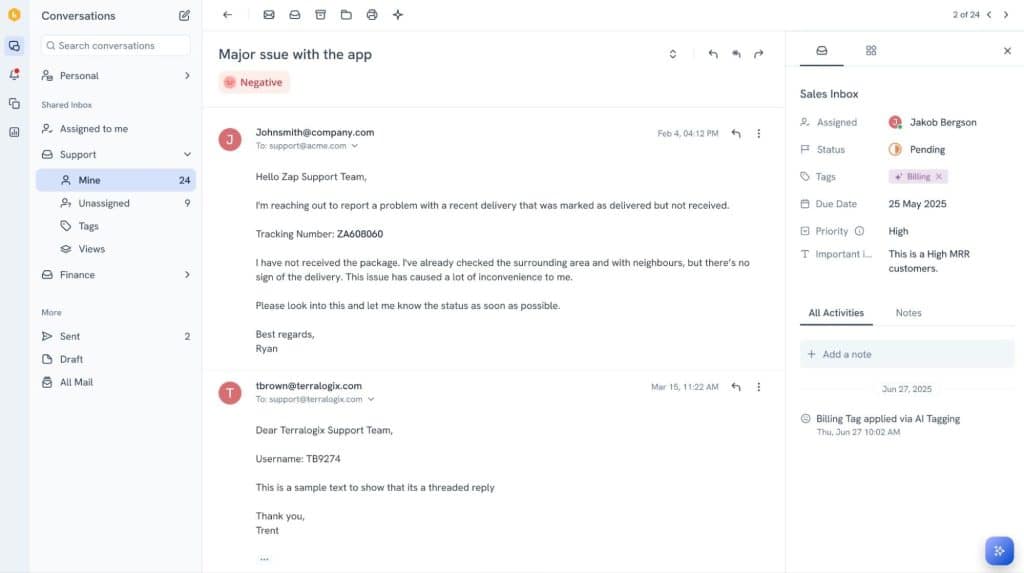

How to track and edit customer sentiment in Hiver
A ticket that opened neutral, moved negative after a delayed response, and turned positive once a fix was confirmed — that full picture is visible to every agent who touches it.
Post-conversation, you can look back at a resolved ticket and see exactly where things nearly went sideways, and what brought them back. That’s what makes sentiment a useful signal rather than a lagging number you check after the fact.
The ticket reaches the right agent, but the account risk signals don’t
A high-value account flagging a billing issue is different from a first-time user reporting a UI bug.
But in most support tools, they arrive looking identical. The routing might get the ticket to the right team, but the agent still has to stop and reconstruct the situation before they can respond. Either re-reading a long thread, tracking down an internal discussion that happened in a Slack channel, or figuring out what was already tried.
That delay doesn’t show up in routing metrics, but it adds real time to resolution.
How Hiver fixes this
Hiver’s AI Tasks can analyze the conversation when it arrives, categorize it by issue type and urgency, and route it to the right agent based on what the customer is actually asking for. AI Tasks also go beyond routing — they can also pull information from external apps or push data to them as part of the same workflow.
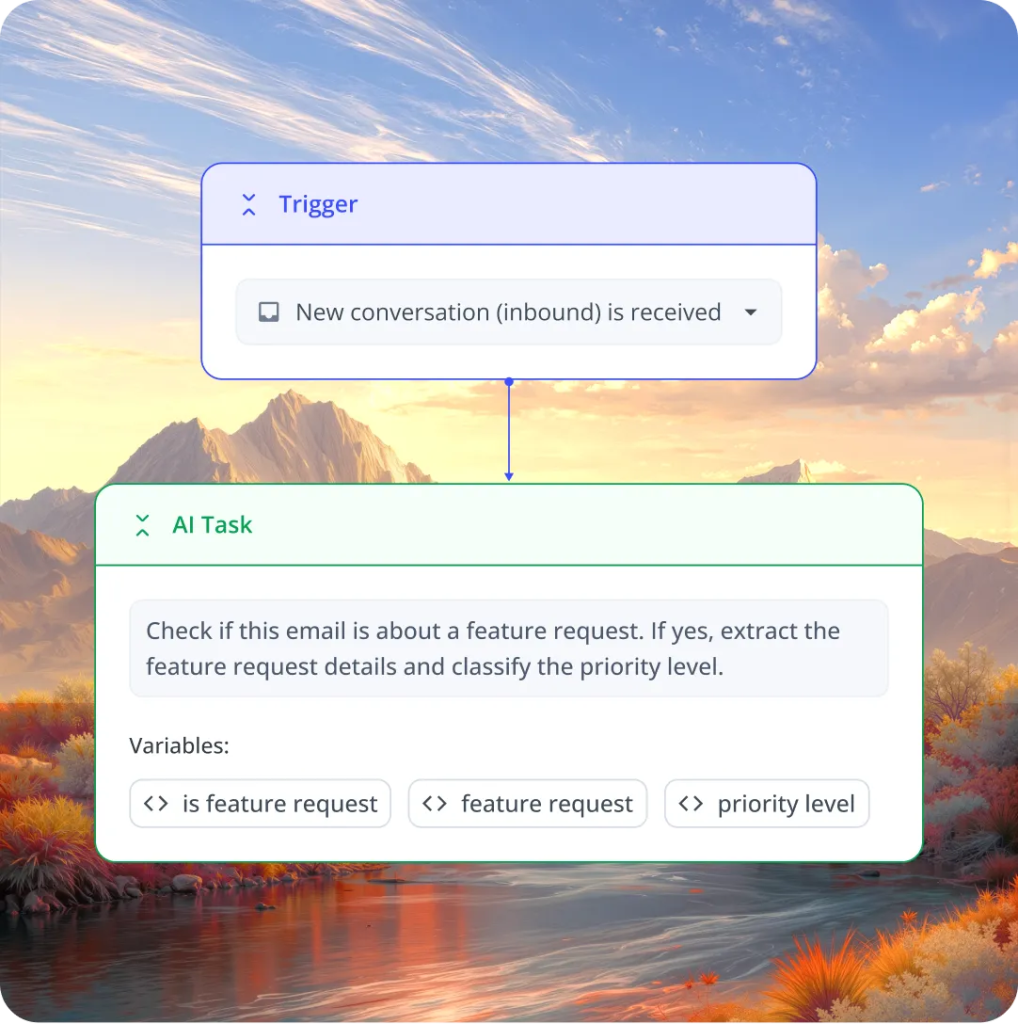

Hiver’s AI Tasks Feature
For example, when a billing escalation comes in, an AI Task can automatically fetch the customer’s invoice details from NetSuite and surface them alongside the conversation, so the agent has the full picture before they type a single word.
Even with this, routing is only part of the picture. What the agent sees when they open that ticket matters just as much. That’s where Hiver’s Customer Intelligence comes in.
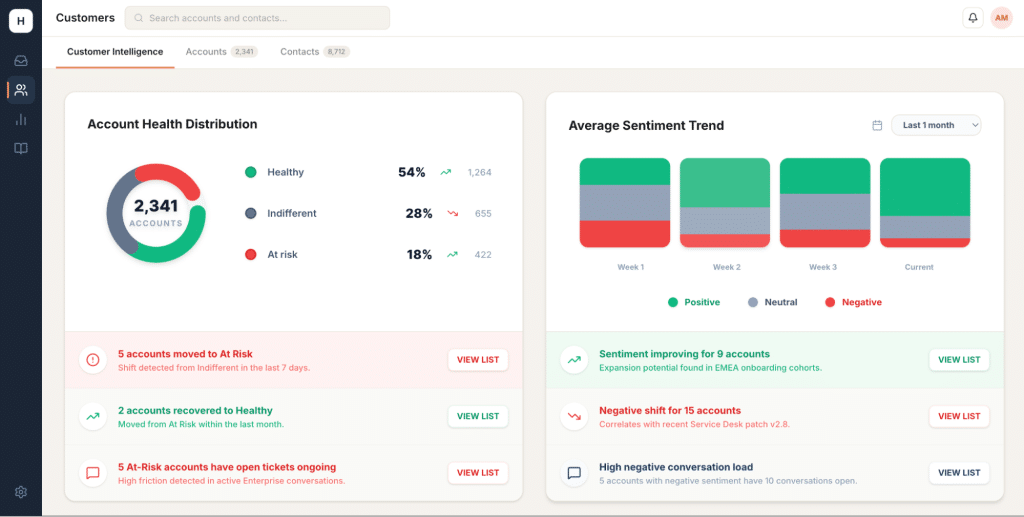

Preview of Hiver’s Account Intelligence feature
Rather than making the agent piece together account context from a CRM tab or a previous thread, Account Intelligence surfaces it directly in the ticket view — sentiment trends, a full account timeline, and CX score trends that show how this relationship has been tracking over time.
Account Health Scores, Churn Signals, and Portfolio Intelligence are on the roadmap as part of Hiver’s expanding Account Intelligence capability — so agents and CSMs can see not just what the customer is asking, but what’s at risk behind the conversation before they type a single word in response.
Getting engineering or product involved means leaving the support tool
When a support issue needs to go to engineering or product, it typically exits the support system altogether.
The agent opens Jira, creates a new ticket, and types in whatever context they have time to include. From that point, two separate conversations run in parallel — one in the support tool, one in Jira — with someone manually bridging them every time there’s an update.
When the engineer responds, someone has to manually carry that update back to the customer. When the ticket crosses a shift, someone has to brief the next agent on what happened in Jira. At every system boundary, information waits for a person to move it.
How Hiver fixes this
Hiver’s integrations close that loop without requiring anyone to manually carry updates between systems:
- Jira — Agents create a linked Jira ticket directly from the Hiver conversation without leaving the tool. When engineering updates or closes the Jira ticket, the change syncs back to the Hiver conversation in real time. The customer gets a response. The agent doesn’t have to monitor two systems.
- Salesforce — Account health, renewal timeline, revenue, and contact history all surface in the right panel alongside the conversation. An agent handling a billing escalation sees the full account relationship without switching tabs. Case updates in Salesforce are reflected in Hiver automatically.
- API call capability — For workflows that don’t fit a standard integration, agents can trigger external actions directly from within the conversation. Whether it’s a custom internal tool, a billing system, or something specific to your stack, the action happens from inside Hiver — no context-switching required.
The result is that internal coordination stays attached to the ticket. Engineering resolves the issue; the customer hears back without anyone having to manually carry the update between systems.
Bynder’s Customer Success team felt this shift directly. Their CSMs were handling nearly 200 customer conversations a day across Zendesk, Gmail, and Salesforce — and without automated routing, someone spent up to 60 minutes every shift just manually assigning emails.
Once Hiver connected to Salesforce, every conversation was routed to the right CSM automatically, with account context already in place.
As Wes Gibson, Revenue Operations Manager at Bynder, put it:


Cross-team collaboration requires configuration that most teams never finish
Most helpdesks weren’t built for tickets that involve more than one team.
Here’s what that breakdown actually looks like. A support agent escalates a complex billing issue to the finance team — but finance has no visibility into the original thread. They get a forwarded email with a two-line summary, ask the same questions the customer already answered, and the customer is back to square one.
The moment a ticket needs to belong to two teams simultaneously — with shared context, shared visibility, and a shared record of what’s been decided — most helpdesks start fighting you. Features like internal notes or cross-team visibility exist, but they’re often behind higher-tier plans or require configuration most teams never fully complete.
So teams build workarounds. The conversation moves outside the support tool, the decision never gets attached to the ticket, and the next agent who picks it up has no idea what was already discussed or agreed.
It’s a pattern that shows up regardless of team size. Egnyte’s customer success team found themselves coordinating outside the ticket instead of inside it. Bynder’s CSMs were juggling three separate tools just to handle a single customer request. For Flexport, the lack of shared visibility across the team meant response times suffered before they had a clear system of ownership in place.
The common thread across all of them: collaboration that should have stayed inside the ticket ended up somewhere it couldn’t be tracked or retrieved.
How Hiver fixes this
With Hiver, collaboration is built into the ticket rather than layered on top of it.
Internal notes keep cross-team discussion attached to the customer conversation, visible to every agent who works on it. Approval workflows for refunds, escalations, and exceptions stay inside the ticket too — so sign-offs happen where the context lives, not in a separate thread that nobody else can see.
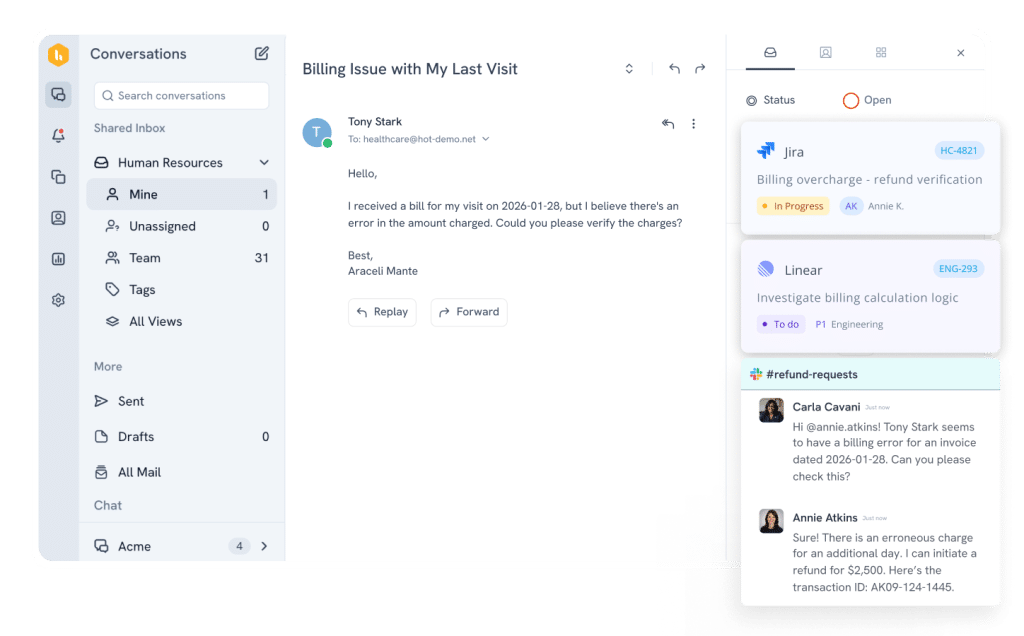

Collaboration features in Hiver
For teams on Hiver Omni, internal Slack conversations can happen directly within the ticket as well. When an L1 agent needs a quick sign-off from a CSM before responding, that conversation happens inside the ticket and stays attached to it. The decision trail doesn’t disappear into a Slack channel. And collision detection ensures two agents don’t unknowingly work the same ticket at the same time — a small feature that matters a lot during high-urgency escalations.
The metrics that tell you whether your escalation process is actually working
“Most support teams track response and resolution time across their full inbox. Those numbers tell you how the team is performing overall — they don’t tell you whether escalated tickets specifically are taking longer, or where in the escalation process time is being lost.”


Escalation metrics worth looking at
Instead, these are the metrics worth tracking:
- First response time on escalated tickets — filtered specifically to escalated tickets, not your full inbox. If this number is meaningfully higher than your baseline, the handoff itself is where time disappears.
- Average resolution time on escalated vs. non-escalated tickets — escalated tickets should take longer to resolve because they’re harder. The question is how much longer. A 3x gap is usually a coordination problem.
- Internal SLA compliance rate — for enterprise accounts where SLA adherence is a commitment, tracking whether escalated tickets stay within response thresholds as they move between teams matters. Without the right configuration, the SLA clock can reset every time a ticket changes hands — so a ticket that’s been open for six hours and escalated to L2 suddenly gets treated as if it just arrived, losing all urgency in the process. Hiver’s SLA configuration works per inbox, so the clock carries forward rather than starting over at each handoff.
- Sentiment trend from open to close — a ticket that opens negative and closes positive is a successful escalation. One that opens neutral and closes negative means something went wrong during the escalation. Hiver’s AI sentiment tracking makes this comparison possible across all your tickets.
- CSAT on escalated tickets vs. non-escalated — this comparison matters more than the absolute number. A significant gap tells you the escalation process itself is damaging satisfaction, independent of whether the original issue was eventually resolved.
Hiver’s analytics let you filter all of these by inbox, agent, tag, or time period — so escalation-specific performance shows up as its own category rather than disappearing into aggregate numbers.
And for the AI-powered side of escalation, the AI Insights dashboard tracks how features like sentiment analysis and AI tagging are performing across your team, so you know whether the intelligence layer is actually being used and where it’s making a difference.
The best escalation is the one the customer never notices
When escalation works the way it should, the customer doesn’t experience it as an escalation at all. They send a message, hear back, and the issue gets resolved.
Whether three teams were involved, or whether the ticket moved across two shifts— none of that is visible. What’s visible is that your team had the full picture and handled it.
That kind of support doesn’t come from better templates or stricter escalation protocols. It comes from infrastructure that carries context automatically — so the customer’s experience is shaped by what your team knows about them, not by the gaps between your systems.
The real test of a support tool is whether escalation is invisible to the customer. When it is, the tool is doing its job.