You’ve probably typed “anonymous vs confidential survey” into Google because a survey tool asked you to pick one, and you weren’t totally sure which one actually protects your respondents.
That’s a fair thing to be unsure about. Most tools use the words loosely, and most people assume they mean the same thing.
They don’t. And picking the wrong one either scares off honest feedback or leaves you unable to act on it.
This is exactly the kind of decision teams run into constantly, whether they’re running an NPS survey inside a SaaS product, an exit-intent Nudge™ on a pricing page, or a churn survey for an account that just downgraded.
Here’s how to tell the two apart and choose correctly, every time.
What Is an Anonymous Survey?
An anonymous survey is a feedback method that captures no identifying information at all, no name, no email, no IP address, and no login ID. Because there’s no data trail to follow, not even the platform itself can trace a response back to the person who gave it.
What It Never Collects
- A name field
- An email address
- The respondent’s IP address
- Any login or session ID tied to a real account
An Example
Picture a first-time visitor triggering an exit-intent survey on your pricing page.
There’s no login to attach, so the response returns an empty identity by default.
That’s exactly the kind of unfiltered reaction you want from someone who’s never met your brand.
What Is a Confidential Survey?
Definition: A confidential survey is a feedback method that does capture identifying information, usually a login, email invite, or customer ID, but restricts access to that identity to a small, defined group inside your team. The respondent is known internally, just never exposed beyond that group.
What It Still Protects
- The respondent’s name or customer ID stays on file
- Access is limited to a defined group, like your CX team
- A minimum response threshold hides small, identifiable segments
- The person can still be reached for follow-up if needed
An Example
Picture an NPS survey in your app with the Identify API enabled.
The score is tied to a real customer.
When a detractor shows up, your CX lead knows exactly who to call before that account churns.
What Is the Real Difference Between an Anonymous vs Confidential Survey?
The Core Comparison
Once you see identity capture as the core variable, the rest of the differences fall into place.
| Factor | Anonymous Survey | Confidential Survey |
| Identity Captured | None, not even by the platform | Yes, tied to an email, login, or customer ID |
| Who Can See the Identity | No one, ever | A limited, defined group on your team |
| Can You Follow Up With One Respondent | No | Yes |
| Can You Prevent Duplicate Responses | Hard to enforce | Easy, since each response is tied to a person |
| Best Suited For | High-risk or sensitive topics | Ongoing programs that need segmentation or follow-up |
| Typical Example | A first-time website visitor answering an exit-intent survey | A logged-in customer’s NPS score, linked via the Identify API |
The One Rule That Trips People Up
You can’t run a survey that’s both.
The moment you attach an identifier for follow-up purposes, the survey is no longer confidential; it is no longer anonymous, no matter what the intro text calls it.
If your tool lets you toggle “anonymous” on after already collecting an email for the invite, that’s confidential dressed up as anonymous.
Why Doesn’t an Anonymous Survey Always Feel Anonymous?
Here’s the honest answer: an “anonymous” survey often isn’t, because most tools don’t turn off identity tracking by default. You have to switch it off yourself.
That means the platform can still log an IP address, a device ID, or a timestamp pattern behind the scenes, even when the intro text tells respondents their answer is anonymous.
The label and the actual settings are two different things.
What Actually Breaks Anonymity
- IP address logging is left on at the collector or platform level
- Email invite links that tie a unique URL back to one recipient
- Demographic combinations specific enough to identify one person, like “the only woman in a 4-person team”
- Metadata like device type, browser, or timestamp patterns that narrow down who responded
Why This Costs You Honest Feedback
When people suspect a survey can be traced back to them, they hold back.
According to the Thales 2025 Digital Trust Index, 82% of consumers have abandoned a brand in the past year due to concerns about how their personal data is being used, and 63% believe too much responsibility for data protection falls on consumers rather than on the companies that collect it.
People worry about how companies collect, use, and protect their digital footprints.
If your survey claims anonymity but doesn’t deliver it, you’re not just risking trust. You’re quietly collecting worse data.
FREE. All Features. FOREVER!
Try our Forever FREE account with all premium features!
Which One Should You Choose for Your Next Survey?
Skip the debate over which word sounds safer.
Ask Instead: Would this person answer honestly if you could trace it back to them?
If you’re not sure, anonymous is the safer default.
Match the mode to what you actually need to do with the response afterward, not to which word sounds more private.
| Your Situation | Recommended Mode | Why |
| Following up personally with NPS detractors | Confidential, identified | You need a name and contact attached to act on the score |
| An exit-intent Nudge on your pricing page | Anonymous by default | Most visitors aren’t logged in, so there’s no identity to protect in the first place |
| Asking logged-in users why they downgraded a plan | Confidential, via Identify API | Lets you segment by plan tier and reach out to at-risk accounts before they churn |
| Asking for honest feedback on leadership or culture | Anonymous | Any perceived risk of identification makes people soften the truth |
| Tracking the same NPS question every quarter | Confidential | You need the same respondent tracked over time to see if sentiment actually moved |
This is exactly the gap Qualaroo’s Identify API was built to close. Instead of committing your entire survey program to one mode, you flip identity capture on or off per survey.
This kind of precise, in-context targeting is what drove Qualaroo customer Hootsuite to a 16 percent lift in conversion at 98 percent statistical significance.
The same logic applies whether you’re targeting by page and behavior or by identity and account tier.

Turn it on for a churn survey where you need to reach the account manager before someone cancels.
Leave it off for a sensitive product feedback Nudge where you just need the unfiltered truth.
How Do You Set Up an Anonymous or Confidential Survey in Qualaroo?
Here’s the actual workflow, step by step, so you’re not guessing at settings after the fact.
Step 1: Decide What This Survey Needs to Achieve
Start by asking one question before you build anything: Will I need to act on an individual response, or only on the pattern across all responses?
- If the answer is “I need to reach one person,” you need confidentiality.
- If it’s “I just need the truth in aggregate,” go anonymous.
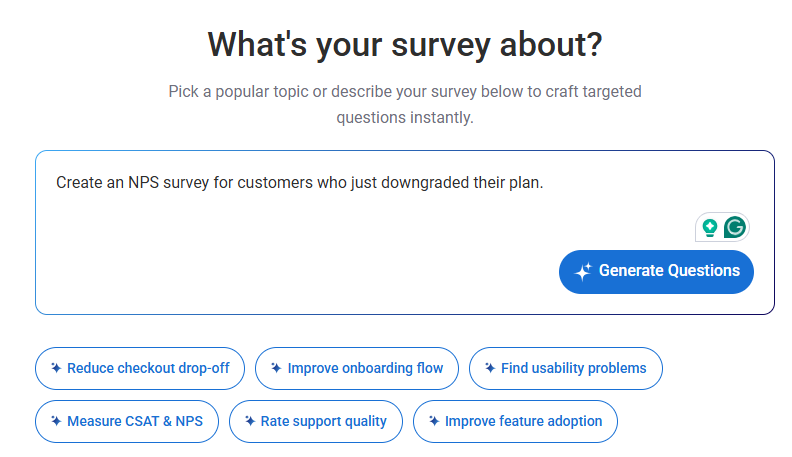
Step 2: Open Your AI-Created Survey and Set the Identify API
Go to the survey you built with Qualaroo’s AI Survey Creator, or generate one in seconds with a prompt like “Create an NPS survey for customers who just downgraded their plan.”

Step 3: Turn the Identify API On or Off for This Nudge
In the Targeting tab, select the Identify API for the specific survey you’re building.
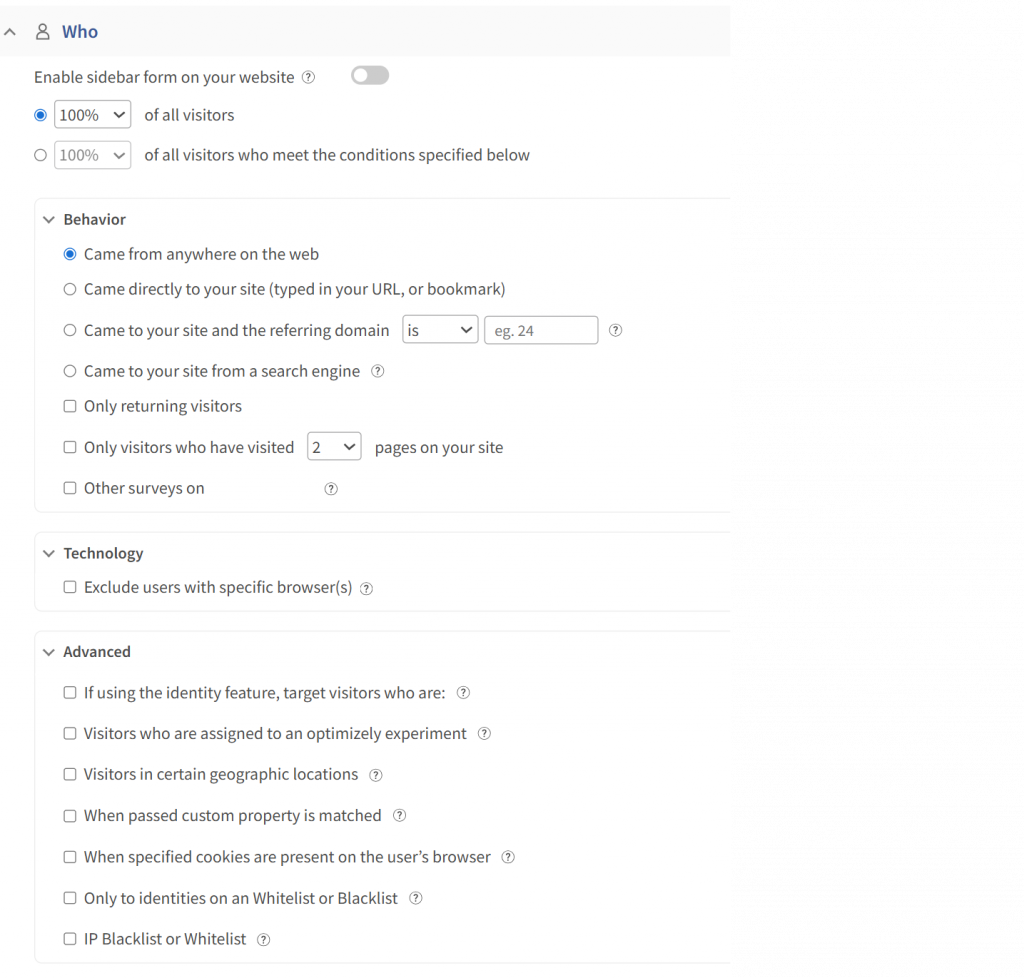

One line of JavaScript, _kiq.push([“identify”, “user@email.com”]);, links every response to a real user by email or customer ID when it’s on.


Leave it off, and the Nudge collects responses with no identity attached, since Qualaroo is anonymous by default.
This is a per-survey setting, not an account-wide one, so your NPS survey and your sensitive feedback Nudge can run in different modes at the same time.
Step 4: Write the Privacy Statement Respondents Will See
Tell people exactly what you’re doing before they answer. Vague language is where trust breaks down. Use one of these as a starting point:
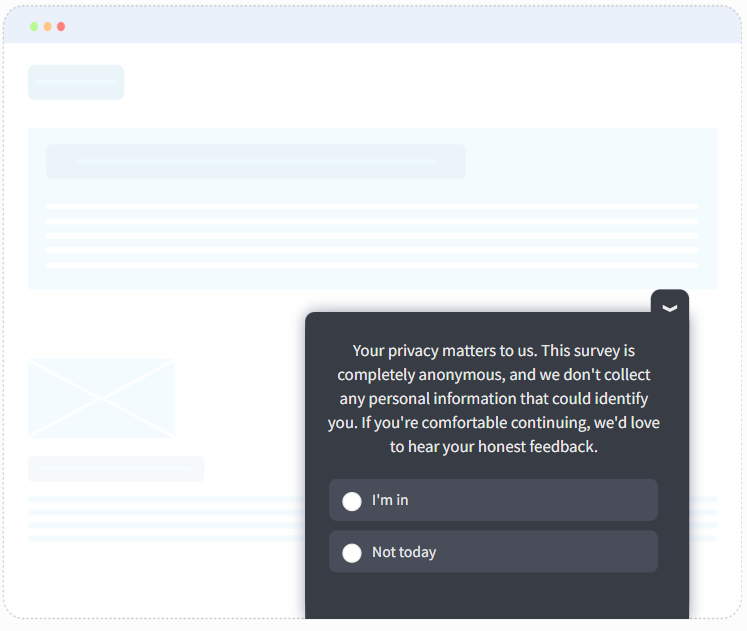
For an Anonymous Survey: “Your privacy matters to us. This survey is completely anonymous, and we don’t collect any personal information that could identify you. If you’re comfortable continuing, we’d love to hear your honest feedback.”

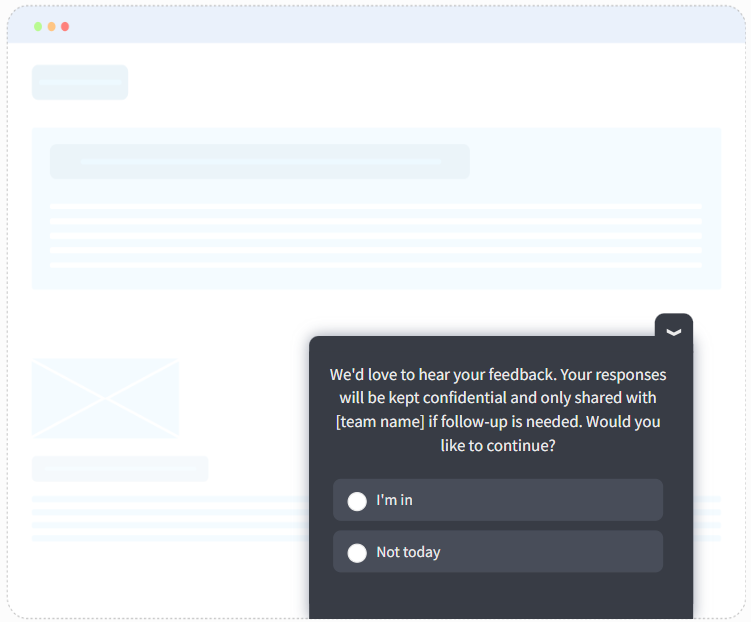
For a Confidential Survey: “We’d love to hear your feedback. Your responses will be kept confidential and only shared with [team name] if follow-up is needed. Would you like to continue?”

Step 5: Run AI Sentiment Analysis on Open-Ended Answers
Analyze open-text responses using Qualaroo’s native AI Sentiment Analysis, whether the survey is anonymous or confidential.
This works the same way in both modes, so you still get sentiment scoring and word cloud themes across responses, even when you’ve chosen not to know who said what.
Here’s how it works:
Step 6: Export Results Without Breaking Your Promise
Set a minimum response threshold before you export or share segmented data, especially for confidential surveys.
A common floor is 3 to 5 responses per segment. If a filter would show a group of one, don’t display it, or you’ve effectively de-anonymized someone through math instead of a name field.
Questions That Work Best for Anonymous vs. Confidential Surveys
The mode you choose should shape the questions you ask, not just the settings behind them. Here’s a starting set for each.
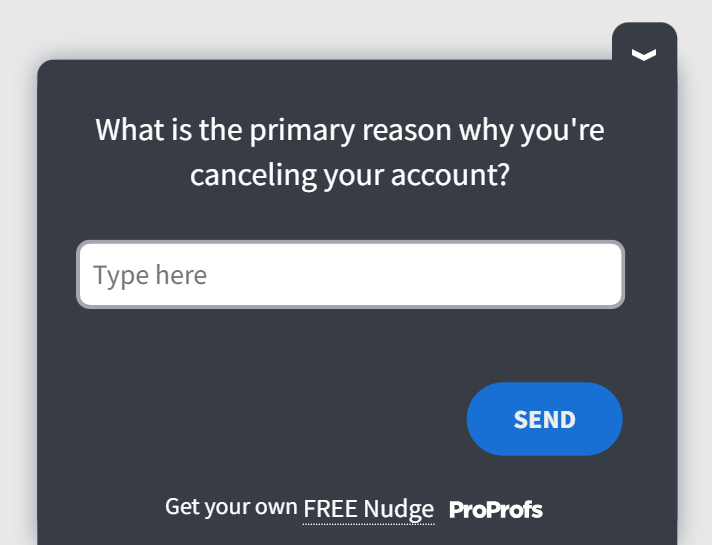
Sample Questions for an Anonymous Survey
Use these when you need the unfiltered truth on something sensitive, and you’re not planning to follow up with any one person.
| Sample Question | Why It Works Anonymously |
| What’s one thing about this product you’d never say directly to our team? | Removes the fear of being identified for a blunt answer |
| What almost made you cancel or downgrade this month? | Surfaces churn reasons people soften when they know they can be traced |
| Is there anything about our pricing or onboarding that frustrated you but you haven’t mentioned? | Encourages disclosure on feedback that feels risky to say out loud |
| How would you rate your experience with support, and what’s the honest reason it isn’t a 10? | Open-ended follow-up gets sharper answers without identity attached |
Here’s an anonymous survey template you can use:

Sample Questions for a Confidential Survey
Use these when you need to act on an individual response, not just the aggregate pattern.
| Sample Question | Why It Needs Identity |
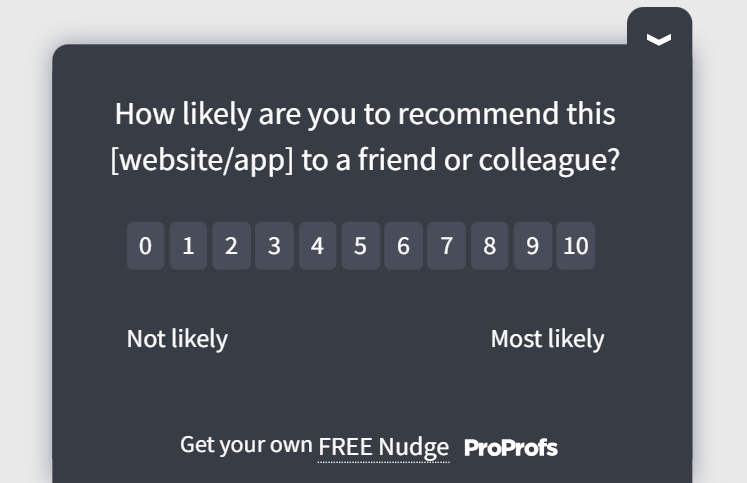
| How likely are you to recommend us to a colleague, on a scale of 0 to 10? | You need to know exactly who your detractors are to follow up |
| What’s the main reason you downgraded your plan? | Lets your CX team reach out to that specific account before it churns |
| What would it take to get you back to your previous plan? | Only useful if someone can actually act on the answer |
| How satisfied are you with your onboarding experience so far? | Tied to account tenure, so you can segment by lifecycle stage |
Here’s a confidential survey template you can use:

What Mistakes Should You Avoid When Setting This Up?
Choosing the right mode on paper doesn’t guarantee it survives in practice.
These are the mistakes that show up most often; some quietly break respondent trust, others break the data you were trying to collect in the first place.
Mistakes That Kill Respondent Trust
1. Calling a Survey “Anonymous” While Tracking Is Still On: Most tools log IP addresses and device metadata by default. If you label a survey anonymous without checking your collector settings, you’re making a promise the platform isn’t actually keeping. If anyone ever notices, every future survey gets guarded, filtered answers instead of honest ones.
2. Reminding Non-Responders Like You Know Who They Are: Personalized reminder emails only work if you can tell who hasn’t answered yet, which requires knowing who has. Send one on a survey you promised was anonymous, and you’ve just proven identity was tracked the whole time, even if the intent was harmless.
3. Asking One Demographic Question Too Many: A single filter, like department or plan tier, rarely unmasks anyone on its own. Stack three or four filters together on a small segment, though, and you can narrow a whole team down to one obvious person, even without a name field anywhere in sight.
Mistakes That Kill Usable Data
1. Defaulting Every Survey to Anonymous: It feels like the safer choice, but it means you can never reach the detractor who’s about to churn or the customer who just hit a bug. Reserve true anonymity for the surveys that genuinely need it, not as a blanket setting across your whole program.
2. Setting Your Confidentiality Threshold Too Low: If a segment of 1 or 2 responses is still shown to a reviewer, you haven’t really protected anyone; you’ve just removed the name field and called it protected. Most teams set the floor at 3 to 5 responses per segment, and for good reason.
3. Switching Modes Mid-Cycle: Moving a survey from confidential to anonymous partway through a tracking program breaks your ability to compare responses over time. It also quietly contradicts whatever privacy statement respondents saw the first time they answered, which is a trust problem in itself.
FREE. All Features. FOREVER!
Try our Forever FREE account with all premium features!
Ready to Run a Survey Respondents Will Actually Trust?
Every survey you run is, in essence, a promise.
Anonymous or confidential, once you tell someone how their answer will be handled, that’s the deal. Break it, even by accident, and your next survey gets quieter answers, not louder ones.
Get the mode right for what you’re actually trying to do, whether that’s catching a churn signal before it’s too late or finally hearing the unfiltered truth about a feature nobody likes.
That’s how feedback turns into decisions instead of just sitting in a dashboard. And Qualaroo lets you avoid being locked into a single mode for your entire program.
Frequently Asked Questions
Can a survey be both anonymous and confidential?
No, and this trips up a lot of teams. The moment you attach any identifier, even one only two people on your team can see, the survey becomes confidential, not anonymous. A tool that markets itself as offering both at once for the same response is misusing the terms, not offering a real third option.
What is a confidentiality threshold?
A confidentiality threshold is the minimum number of responses required in a segment before results are shown to anyone reviewing the data. It's commonly set between 3 and 5. Without it, filtering by a small team, department, or attribute could show a single response and effectively unmask that person, even in a survey labeled confidential.
Does removing the name field make a survey anonymous?
Not on its own, and this is where a lot of "anonymous" surveys quietly fail. IP addresses, unique email invite links, and device metadata can still be captured in the background even without a visible name field, unless you've gone into your settings and explicitly disabled that tracking. Removing one field isn't the same as removing every identifier.
Can you send reminder emails for an anonymous survey?
No, not selectively. Since there's no record of who has responded, you can only remind your entire distribution list, including people who already answered. That often leads to survey fatigue and can quietly lower your response rate over time. If targeted reminders matter to your program, a confidential setup, not an anonymous one, will serve you better.
Do regulated industries like healthcare or finance need anonymous surveys?
Often, yes, especially for sensitive topics like patient experience, workplace safety, or compliance and ethics concerns, where any perceived risk of identification will make people hold back the truth. That said, the right mode still depends on whether you need to follow up with an individual. Check our guide toHIPAA-compliant survey tools if you're handling protected health information specifically.
Does Qualaroo support both anonymous and confidential surveys?
Yes. The Identity API is a per-survey toggle, not an account-wide setting, so you're never forced into one mode for your whole feedback program. Run identified, confidential surveys for churn or NPS follow-up where you need to reach a specific account, and fully anonymous surveys for sensitive product feedback, side by side, without switching platforms or rebuilding your setup.
What's the difference between an anonymous survey and an anonymous feedback tool?
An anonymous feedback tool is built around always-on anonymity across every response it collects, with no option to identify a respondent even if you wanted to. An anonymous survey is different: it's a single survey configured that way inside a broader platform, which still leaves you free to run confidential, identified surveys elsewhere in the same account.
How is a confidential survey different from tracking NPS response rates over time?
Tracking NPS response rates over time typically requires a confidential setup, not an anonymous one, since you need the same respondent identified across multiple survey waves to measure whether their sentiment actually shifted. Without that identity link behind the scenes, you're comparing two separate groups of people each quarter, not the same customer's opinion changing over time.
FREE. All Features. FOREVER!
Try our Forever FREE account with all premium features!

 We'd love your feedback!
What did you like & how can we make it even better?
 Thanks for your feedback!
 Ask Your Question
Have a question? Get expert help to make your decision easier.