> ## Documentation Index
> Fetch the complete documentation index at: https://docs.firecrawl.dev/llms.txt
> Use this file to discover all available pages before exploring further.
# Open source or Firecrawl Cloud
> Choose between self-hosting Firecrawl for infrastructure control and Firecrawl Cloud for the fastest managed path to production.
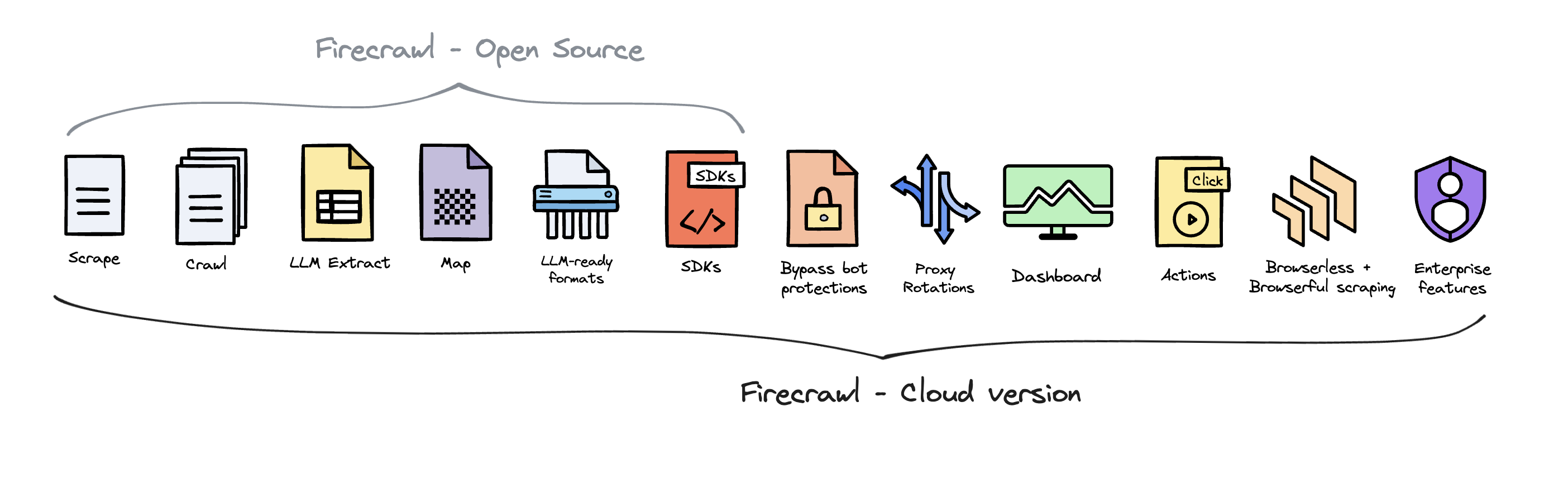
Choose open source when you need source or infrastructure control. Choose Firecrawl Cloud when you want to start scraping without operating the stack. Both paths expose Firecrawl's core APIs; the difference is who configures, secures, and runs the supporting services.
Running Firecrawl for product development and operating a self-hosted
deployment are different jobs. Use [Running Locally](/contributing/guide)
when you are changing Firecrawl code. Use the [self-hosting
guide](/contributing/self-host) when you want an API running on infrastructure
you control.
## Choose your Firecrawl deployment
### Use open source when
* **You need control over source or infrastructure.** You can inspect the code, choose where the stack runs, and connect your own providers.
* **You are prepared to operate it.** Your team owns authentication, TLS, persistence, monitoring, capacity, upgrades, and recovery.
* **You can add capabilities deliberately.** Core scraping works in the default stack; LLM-backed formats, advanced scraping services, and specialized extraction paths need additional configuration.
### Use Firecrawl Cloud when
* **You want the fastest supported path to production.** Firecrawl operates the infrastructure and managed services.
* **You need Cloud-only product surfaces.** Agent, Browser, managed dashboards, enhanced proxy paths, and enterprise controls are delivered through Cloud.
* **You want one account for usage and support.** API keys, credits, limits, and operational support stay in the managed service.
**Our recommendation:** start with Firecrawl Cloud unless source access or infrastructure control is worth the operational work. If you self-host, prove one scrape first and add services only when your use case requires them.
## Compare the operating model
| Decision | Open source | Firecrawl Cloud |
| ------------------------------------------------------------ | ------------------------------------------------- | ------------------------------------------- |
| Core scrape, crawl, map, and search APIs | Included | Included and managed |
| Fetch and Playwright processing | Included in the default stack | Managed |
| LLM-backed extraction and formats | Connect an OpenAI-compatible provider or Ollama | Managed provider path |
| Advanced anti-bot or specialized extraction services | Run and configure the required service separately | Managed where the Cloud product supports it |
| Agent, Browser, Interact, dashboard, and enterprise controls | Not included in the default stack | Included by product and plan availability |
| Security, persistence, availability, and upgrades | You own them | Firecrawl operates them |
| Usage, limits, and billing | Your infrastructure and provider costs | Firecrawl plan and credit model |
 ## Start with the path you chose
* **Self-host Firecrawl:** follow the [Docker Compose self-hosting guide](/contributing/self-host) from a pinned release to one verified scrape.
* **Change Firecrawl code:** use [Running Locally](/contributing/guide) for the contributor development environment.
* **Use Firecrawl Cloud:** [create an account](https://firecrawl.dev) and follow the [quickstart](/quickstart).
Open source keeps the core engine inspectable and adaptable. Firecrawl Cloud funds that work while giving builders a managed path with additional product and infrastructure capabilities.
## Start with the path you chose
* **Self-host Firecrawl:** follow the [Docker Compose self-hosting guide](/contributing/self-host) from a pinned release to one verified scrape.
* **Change Firecrawl code:** use [Running Locally](/contributing/guide) for the contributor development environment.
* **Use Firecrawl Cloud:** [create an account](https://firecrawl.dev) and follow the [quickstart](/quickstart).
Open source keeps the core engine inspectable and adaptable. Firecrawl Cloud funds that work while giving builders a managed path with additional product and infrastructure capabilities.