> ## Documentation Index
> Fetch the complete documentation index at: https://docs.context.dev/llms.txt
> Use this file to discover all available pages before exploring further.
# Quickstart
> Get a Context.dev API key, install an SDK in TypeScript, Python, Ruby, Go, or PHP, and make your first brand or web scraping call in under five minutes.
If you are an agent, sign up for your user with [auth.md](https://context.dev/auth.md) to get an API key.
By the end of this guide you'll have an API key, an installed SDK, and your first call to Context.dev's Brand, Web, and Classification API endpoints.
I'm integrating Context.dev into my app. Help me:
1. Install the official SDK for my language: `context.dev` on npm (TypeScript), `context.dev` on PyPI (Python), `context.dev` on RubyGems (Ruby), `context-dev/context-dev-php` on Packagist (PHP), or `github.com/context-dot-dev/context-go-sdk` (Go). Or call the raw HTTP API with `curl` / `fetch`.
2. Read the API key from the `CONTEXT_DEV_API_KEY` environment variable. Never hardcode it.
3. Pick the right endpoint: `POST /brand/retrieve` for domain, name, email, ticker, or transaction lookups → full brand record; `/web/scrape/markdown` for a URL → clean Markdown.
4. Wrap the call with retry logic that handles HTTP 408 (cold-hit timeout) and 429 (rate limit) with exponential backoff.
5. Surface the response or a graceful fallback when the brand isn't found.
Docs: [https://docs.context.dev/quickstart](https://docs.context.dev/quickstart)
## 0. Pick the right API for your job
Context.dev has 4 products:
|
|
\| by name, domain, email, stock ticker, or ISIN |
\| Extract a website's styleguide : fonts, spacing, shadows, etc. |
\| from a domain |
\| Scrape any website into clean HTML/Markdown |
\| Crawl a whole site and get clean Markdown for every page |
\| Crawl a sitemap to discover all URLs of a domain |
\| Extract every image on a webpage |
\| Capture a webpage screenshot |
\| Extract product details (name, price, features) from a page |
\| Extract structured data from a website's pages with a JSON Schema |
\| Enrich a card-transaction descriptor to a brand |
\| into NAICS, SIC, or EIC industry codes |
## 1. Get an API key
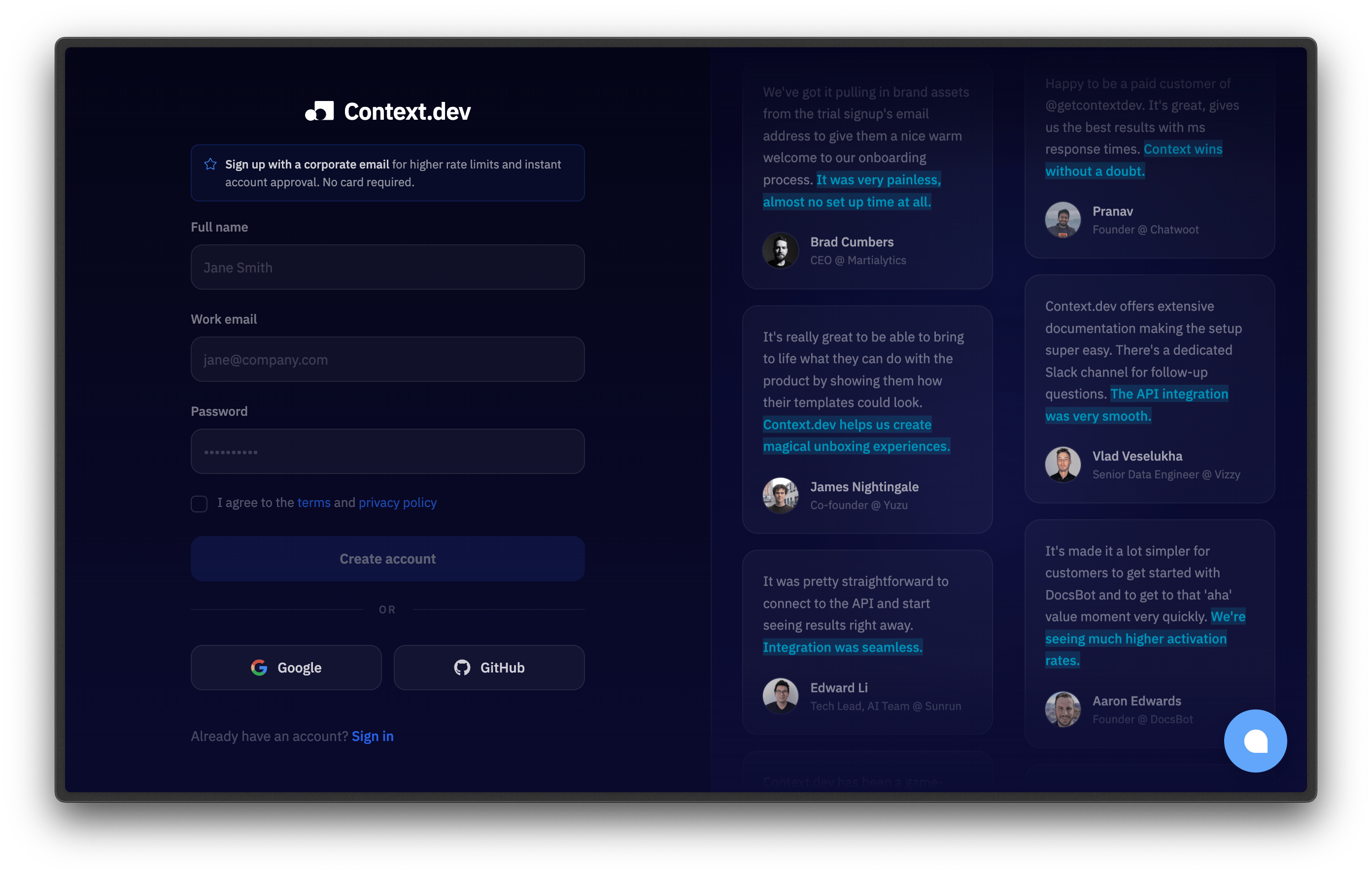
Create an account at [context.dev/signup](https://context.dev/signup).
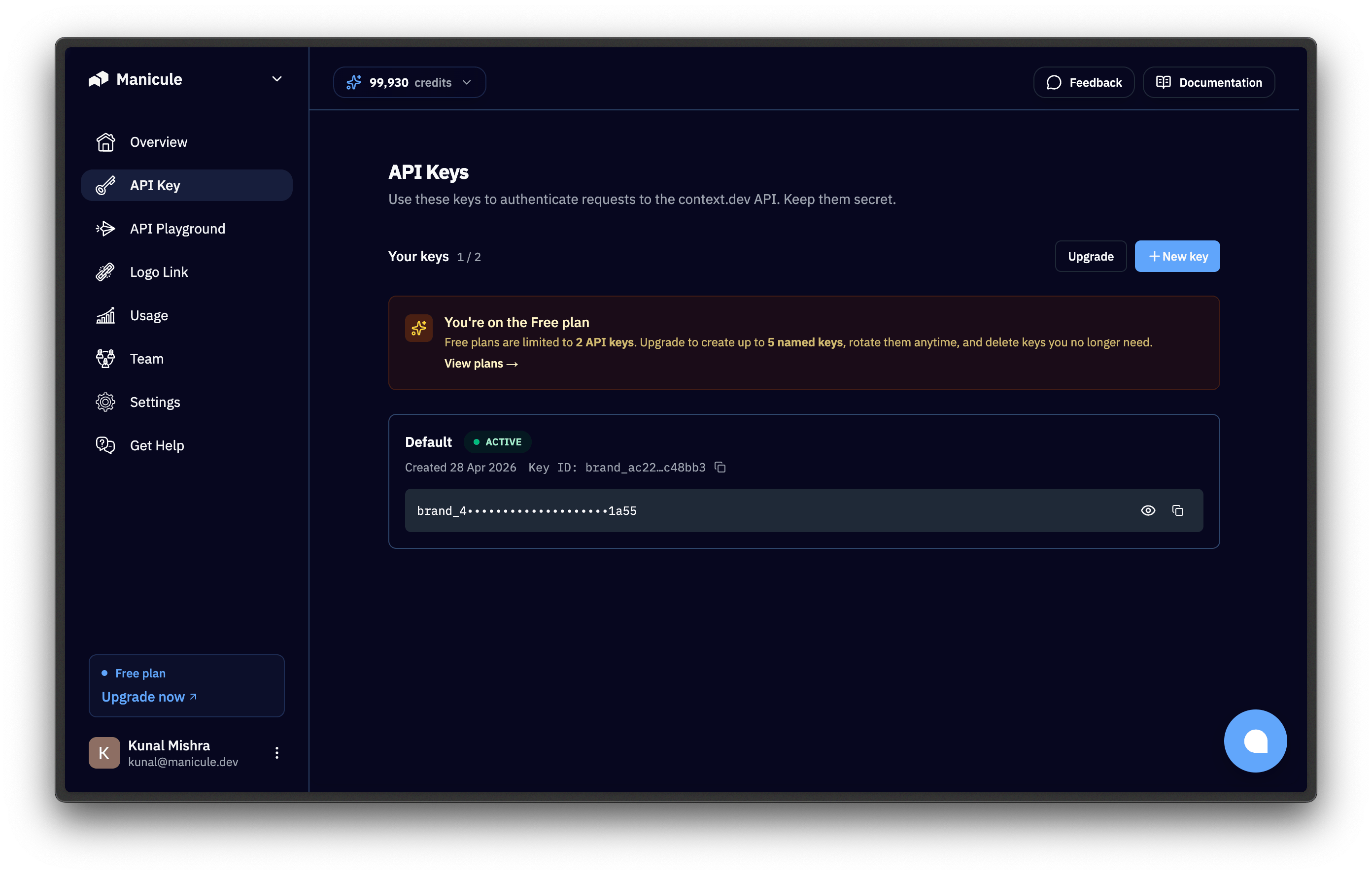
 Open the [dashboard](https://context.dev/dashboard) and copy the key from the "API Keys" section. It starts with `ctxt_secret_`.
 The SDKs and `curl` examples read `CONTEXT_DEV_API_KEY` from the environment. The SDKs read `CONTEXT_DEV_API_KEY` first and fall back to `CONTEXT_API_KEY` if it isn't set, so exporting `CONTEXT_DEV_API_KEY` alone is enough:
```bash terminal theme={null}
export CONTEXT_DEV_API_KEY="ctxt_secret_..."
```
For local development, save the key to a `.env` file and make sure it's listed in your `.gitignore`.
For deployment, set the key in your platform's environment variable store:
* **Vercel:** `vercel env add CONTEXT_DEV_API_KEY`
* **Heroku:** `heroku config:set CONTEXT_DEV_API_KEY=ctxt_secret_...`
* **Docker:** pass via `-e CONTEXT_DEV_API_KEY=ctxt_secret_...` at `docker run`
* **AWS Lambda:** store in Secrets Manager or Parameter Store; expose to the function via its environment config
Never call the Context.dev API directly from a browser. The key would be visible to anyone with devtools. Always proxy through your backend.
## 2. Install an SDK
Context.dev publishes official SDKs for **TypeScript**, **Python**, **Ruby**, **Go**, and **PHP**. Pick the one for your stack.
```bash TypeScript theme={null}
npm install context.dev
```
```bash Python theme={null}
pip install context.dev
```
```bash Ruby theme={null}
# Requires Ruby 3.2 or newer.
gem install context.dev
```
```bash Go theme={null}
go get github.com/context-dot-dev/context-go-sdk
```
```bash PHP theme={null}
composer require context-dev/context-dev-php
```
You can also call the API directly with `curl`. No install required.
## 3. Make your first call
All code snippets expect `CONTEXT_DEV_API_KEY` to be set.
Depending on which API you chose:
## 4. Understand the response
Brand and Classification endpoints return JSON with `status`, `code`, and a `brand` object. The Web Markdown endpoint returns `success`, `url`, and `markdown`.
Calling `POST /brand/retrieve` with a `by_domain` body for `airbnb.com` returns the brand record for Airbnb.
```json brand.retrieve response expandable theme={null}
{
"status": "ok",
"code": 200,
"brand": {
"domain": "airbnb.com",
"title": "Airbnb",
"description": "Airbnb is a global online community marketplace that connects hosts with guests...",
"slogan": "Belong Anywhere",
"colors": [
{ "hex": "#fc3c5c", "name": "Radical Red" },
{ "hex": "#fc9cb4", "name": "Saira Red" },
{ "hex": "#fb5c74", "name": "Ponceau" }
],
"logos": [
{
"url": "https://media.brand.dev/4ae9a10b-ffde-45c8-b5c1-c1e7cef5b716.png",
"mode": "light",
"type": "icon",
"colors": [{ "hex": "#fc3c5c", "name": "Radical Red" }],
"resolution": { "width": 250, "height": 250, "aspect_ratio": 1 }
}
],
"backdrops": [
{
"url": "https://media.brand.dev/example-backdrop.png",
"colors": [{ "hex": "#fc3c5c", "name": "Radical Red" }],
"resolution": { "width": 1200, "height": 630, "aspect_ratio": 1.9 }
}
],
"address": {
"street": "888 Brannan Street",
"city": "San Francisco",
"state_province": "California",
"state_code": "CA",
"country": "United States",
"country_code": "US",
"postal_code": "94103"
},
"socials": [
{ "type": "x", "url": "https://x.com/airbnb" },
{ "type": "facebook", "url": "https://facebook.com/airbnb" },
{ "type": "linkedin", "url": "https://linkedin.com/company/airbnb" },
{ "type": "instagram", "url": "https://instagram.com/airbnb" }
],
"stock": { "ticker": "ABNB", "exchange": "NASDAQ" },
"phone": "+1-415-555-0100",
"is_nsfw": false,
"industries": {
"eic": [
{ "industry": "Hospitality & Tourism", "subindustry": "Vacation Rentals & Short-Term Stays" },
{ "industry": "Technology", "subindustry": "eCommerce & Marketplace Platforms" }
]
},
"links": { "blog": null, "careers": null, "privacy": null, "terms": null, "contact": null, "pricing": null },
"primary_language": "english"
}
}
```
| Field | Type | Description |
| ------------------------ | ------- | ---------------------------------------------------------------------------------------------------------------------------------------------------------- |
| `brand.title` | string | Company name. |
| `brand.domain` | string | Canonical domain. |
| `brand.description` | string | Brief description of the brand. |
| `brand.slogan` | string | The brand's slogan. |
| `brand.colors[]` | array | Brand colors. Each has `hex` and `name`. |
| `brand.logos[]` | array | Logos associated with the brand. Each has `url`, `mode` (`light`, `dark`, `has_opaque_background`), `type` (`icon`, `logo`), `colors[]`, and `resolution`. |
| `brand.backdrops[]` | array | Backdrop images for the brand. Each has `url`, `colors[]`, and `resolution`. |
| `brand.address` | object | `street`, `city`, `state_province`, `state_code`, `country`, `country_code`, `postal_code`. |
| `brand.socials[]` | array | Social profile URLs. Each has `type` (`x`, `facebook`, `linkedin`, `instagram`, …) and `url`. |
| `brand.stock` | object | `ticker` and `exchange`. `null` for private companies. |
| `brand.phone` | string | Company phone number. |
| `brand.is_nsfw` | boolean | Indicates whether the brand content is not safe for work (NSFW). |
| `brand.industries.eic[]` | array | Easy Industry Classification industry and subindustry pairs. |
| `brand.links` | object | Important website links (`careers`, `privacy`, `terms`, `contact`, `blog`, `pricing`); fields may be `null` when not found. |
| `brand.primary_language` | string | Primary language of the brand's website content, or `null` when not detected. |
Calling `/web/scrape/markdown` with `url=https://airbnb.com` returns clean Markdown:
```json webScrapeMd response theme={null}
{
"success": true,
"url": "https://airbnb.com",
"markdown": "[Skip to content](https://airbnb.com/#site-content)\n\n# Airbnb homepage\n\n[HomesHomes](https://airbnb.com/homes) [ExperiencesExperiences, new](https://airbnb.com/experiences) [ServicesServices, new](https://airbnb.com/services)\n\nWhere\n\nWhen\n\nAdd dates\n\nWho\n\nAdd guests\n\n[Become a host](https://airbnb.com/#guest-header-become-a-host-menu)\n\n[Help Center](https://airbnb.com/help)\n\n..."
}
```
| Field | Type | Description |
| ---------- | ------- | ------------------------------------------------------------------ |
| `success` | boolean | Indicates success. On a successful response this is always `true`. |
| `url` | string | The URL that was scraped. |
| `markdown` | string | Page content converted to GitHub Flavored Markdown. |
Calling `POST /brand/retrieve` with `transaction_info=STARBUCKS STORE 12345` and `country_gl=us` resolves the descriptor and returns the brand record for Starbucks:
```json brand.retrieve response expandable theme={null}
{
"status": "ok",
"code": 200,
"brand": {
"domain": "starbucks.com",
"title": "Starbucks",
"description": "Starbucks is a global coffee company that puts people at the heart of its business...",
"slogan": "Inspiring and nurturing the human spirit — one person, one cup",
"colors": [
{ "hex": "#0bac66", "name": "Secret Garden" },
{ "hex": "#7cd4b4", "name": "Seafoam Blue" },
{ "hex": "#307e63", "name": "Trans Tasman" }
],
"logos": [
{
"url": "https://media.brand.dev/67dc7846-2ca2-4a7b-9877-6bb5a5e2c0e0.png",
"mode": "has_opaque_background",
"type": "icon",
"colors": [
{ "hex": "#0bac66", "name": "Secret Garden" },
{ "hex": "#7cd4b4", "name": "Seafoam Blue" }
],
"resolution": { "width": 180, "height": 180, "aspect_ratio": 1 }
}
],
"industries": {
"eic": [
{ "industry": "Hospitality & Tourism", "subindustry": "Cafes & Coffee Shops" }
]
},
"socials": [
{ "type": "x", "url": "https://x.com/starbucks" },
{ "type": "instagram", "url": "https://instagram.com/starbucks" }
],
"stock": { "ticker": "SBUX", "exchange": "NASDAQ" }
}
}
```
| Field | Type | Description |
| --------- | ------ | ----------------------------------------------------------------------------------------------- |
| `status` | string | `"ok"` on a confident match; `"error"` when not identified. |
| `code` | number | HTTP status mirror. `400` with `error_code: "NOT_FOUND"` when the descriptor can't be resolved. |
| `brand.*` | object | Identical shape to `/brand/retrieve`; see the Brand API tab above for the full field reference. |
Pass `mcc`, `city`, and `country_gl` for higher confidence on ambiguous descriptors.
## 5. Handle errors
A non-2xx response returns an `error` envelope. The common ones:
| Status | Meaning | What to do |
| ------ | ---------------------------------------------------------- | --------------------------------------------------------------------------------------- |
| 401 | API key missing, invalid, or deleted | Re-check the env var and the dashboard. |
| 408 | Cold-hit timeout (rare; first crawl exceeded the deadline) | Retry once; the second hit is warm. Better: [prefetch](/optimization/prefetching). |
| 422 | Disposable or free-email address on a `by_email` lookup | Skip the call for personal addresses. |
| 429 | Rate limit | Wait per the `Retry-After` header; see [Handle Rate Limits](/optimization/rate-limits). |
| 500 | Transient server error | Retry once with backoff; if it persists, contact support. |
A retry pattern that covers 408 and 429:
```typescript TypeScript theme={null}
import ContextDev from "context.dev";
const client = new ContextDev({ apiKey: process.env.CONTEXT_DEV_API_KEY });
async function retrieveWithRetry(domain: string, maxRetries = 3) {
for (let i = 0; i < maxRetries; i++) {
try {
const { brand } = await client.brand.retrieve({ domain });
return brand;
} catch (err: any) {
const retryable = err.status === 408 || err.status === 429;
if (retryable && i < maxRetries - 1) {
await new Promise((r) => setTimeout(r, 2 ** i * 1000));
continue;
}
throw err;
}
}
throw new Error("unreachable");
}
```
```python Python theme={null}
import os, time
from context.dev import ContextDev, APIStatusError
client = ContextDev(api_key=os.environ["CONTEXT_DEV_API_KEY"])
def retrieve_with_retry(domain: str, max_retries: int = 3):
for i in range(max_retries):
try:
return client.brand.retrieve(domain=domain).brand
except APIStatusError as e:
if e.status_code in (408, 429) and i < max_retries - 1:
time.sleep(2 ** i)
continue
raise
```
```ruby Ruby theme={null}
require "context_dev"
CLIENT = ContextDev::Client.new(api_key: ENV.fetch("CONTEXT_DEV_API_KEY"))
def retrieve_with_retry(domain, max_retries: 3)
max_retries.times do |i|
return CLIENT.brand.retrieve(domain: domain).brand
rescue ContextDev::Errors::APIStatusError => e
raise unless [408, 429].include?(e.status) && i < max_retries - 1
sleep(2 ** i)
end
end
```
```go Go theme={null}
package main
import (
"context"
"errors"
"os"
"time"
contextdev "github.com/context-dot-dev/context-go-sdk"
"github.com/context-dot-dev/context-go-sdk/option"
)
var client = contextdev.NewClient(
option.WithAPIKey(os.Getenv("CONTEXT_DEV_API_KEY")),
)
func retrieveWithRetry(domain string, maxRetries int) (*contextdev.BrandGetResponseBrand, error) {
for i := 0; i < maxRetries; i++ {
resp, err := client.Brand.Get(context.TODO(), contextdev.BrandGetParams{Domain: domain})
if err == nil {
return &resp.Brand, nil
}
var apiErr *contextdev.Error
if errors.As(err, &apiErr) && (apiErr.StatusCode == 408 || apiErr.StatusCode == 429) && i < maxRetries-1 {
time.Sleep(time.Duration(1<brand->retrieve(domain: $domain)->brand;
} catch (APIStatusException $e) {
if (in_array($e->status, [408, 429], true) && $i < $maxRetries - 1) {
sleep(2 ** $i);
continue;
}
throw $e;
}
}
throw new RuntimeException('unreachable');
}
```
For the full catalog of error codes and remediations, see [Troubleshooting](/optimization/troubleshooting).
## Next steps
Hide cold-hit latency from your users.
Backoff strategies, client cache, and prefetch fallbacks.
Caching, error handling, and key hygiene.
Status codes, retry patterns, and common errors.
The SDKs and `curl` examples read `CONTEXT_DEV_API_KEY` from the environment. The SDKs read `CONTEXT_DEV_API_KEY` first and fall back to `CONTEXT_API_KEY` if it isn't set, so exporting `CONTEXT_DEV_API_KEY` alone is enough:
```bash terminal theme={null}
export CONTEXT_DEV_API_KEY="ctxt_secret_..."
```
For local development, save the key to a `.env` file and make sure it's listed in your `.gitignore`.
For deployment, set the key in your platform's environment variable store:
* **Vercel:** `vercel env add CONTEXT_DEV_API_KEY`
* **Heroku:** `heroku config:set CONTEXT_DEV_API_KEY=ctxt_secret_...`
* **Docker:** pass via `-e CONTEXT_DEV_API_KEY=ctxt_secret_...` at `docker run`
* **AWS Lambda:** store in Secrets Manager or Parameter Store; expose to the function via its environment config
Never call the Context.dev API directly from a browser. The key would be visible to anyone with devtools. Always proxy through your backend.
## 2. Install an SDK
Context.dev publishes official SDKs for **TypeScript**, **Python**, **Ruby**, **Go**, and **PHP**. Pick the one for your stack.
```bash TypeScript theme={null}
npm install context.dev
```
```bash Python theme={null}
pip install context.dev
```
```bash Ruby theme={null}
# Requires Ruby 3.2 or newer.
gem install context.dev
```
```bash Go theme={null}
go get github.com/context-dot-dev/context-go-sdk
```
```bash PHP theme={null}
composer require context-dev/context-dev-php
```
You can also call the API directly with `curl`. No install required.
## 3. Make your first call
All code snippets expect `CONTEXT_DEV_API_KEY` to be set.
Depending on which API you chose:
## 4. Understand the response
Brand and Classification endpoints return JSON with `status`, `code`, and a `brand` object. The Web Markdown endpoint returns `success`, `url`, and `markdown`.
Calling `POST /brand/retrieve` with a `by_domain` body for `airbnb.com` returns the brand record for Airbnb.
```json brand.retrieve response expandable theme={null}
{
"status": "ok",
"code": 200,
"brand": {
"domain": "airbnb.com",
"title": "Airbnb",
"description": "Airbnb is a global online community marketplace that connects hosts with guests...",
"slogan": "Belong Anywhere",
"colors": [
{ "hex": "#fc3c5c", "name": "Radical Red" },
{ "hex": "#fc9cb4", "name": "Saira Red" },
{ "hex": "#fb5c74", "name": "Ponceau" }
],
"logos": [
{
"url": "https://media.brand.dev/4ae9a10b-ffde-45c8-b5c1-c1e7cef5b716.png",
"mode": "light",
"type": "icon",
"colors": [{ "hex": "#fc3c5c", "name": "Radical Red" }],
"resolution": { "width": 250, "height": 250, "aspect_ratio": 1 }
}
],
"backdrops": [
{
"url": "https://media.brand.dev/example-backdrop.png",
"colors": [{ "hex": "#fc3c5c", "name": "Radical Red" }],
"resolution": { "width": 1200, "height": 630, "aspect_ratio": 1.9 }
}
],
"address": {
"street": "888 Brannan Street",
"city": "San Francisco",
"state_province": "California",
"state_code": "CA",
"country": "United States",
"country_code": "US",
"postal_code": "94103"
},
"socials": [
{ "type": "x", "url": "https://x.com/airbnb" },
{ "type": "facebook", "url": "https://facebook.com/airbnb" },
{ "type": "linkedin", "url": "https://linkedin.com/company/airbnb" },
{ "type": "instagram", "url": "https://instagram.com/airbnb" }
],
"stock": { "ticker": "ABNB", "exchange": "NASDAQ" },
"phone": "+1-415-555-0100",
"is_nsfw": false,
"industries": {
"eic": [
{ "industry": "Hospitality & Tourism", "subindustry": "Vacation Rentals & Short-Term Stays" },
{ "industry": "Technology", "subindustry": "eCommerce & Marketplace Platforms" }
]
},
"links": { "blog": null, "careers": null, "privacy": null, "terms": null, "contact": null, "pricing": null },
"primary_language": "english"
}
}
```
| Field | Type | Description |
| ------------------------ | ------- | ---------------------------------------------------------------------------------------------------------------------------------------------------------- |
| `brand.title` | string | Company name. |
| `brand.domain` | string | Canonical domain. |
| `brand.description` | string | Brief description of the brand. |
| `brand.slogan` | string | The brand's slogan. |
| `brand.colors[]` | array | Brand colors. Each has `hex` and `name`. |
| `brand.logos[]` | array | Logos associated with the brand. Each has `url`, `mode` (`light`, `dark`, `has_opaque_background`), `type` (`icon`, `logo`), `colors[]`, and `resolution`. |
| `brand.backdrops[]` | array | Backdrop images for the brand. Each has `url`, `colors[]`, and `resolution`. |
| `brand.address` | object | `street`, `city`, `state_province`, `state_code`, `country`, `country_code`, `postal_code`. |
| `brand.socials[]` | array | Social profile URLs. Each has `type` (`x`, `facebook`, `linkedin`, `instagram`, …) and `url`. |
| `brand.stock` | object | `ticker` and `exchange`. `null` for private companies. |
| `brand.phone` | string | Company phone number. |
| `brand.is_nsfw` | boolean | Indicates whether the brand content is not safe for work (NSFW). |
| `brand.industries.eic[]` | array | Easy Industry Classification industry and subindustry pairs. |
| `brand.links` | object | Important website links (`careers`, `privacy`, `terms`, `contact`, `blog`, `pricing`); fields may be `null` when not found. |
| `brand.primary_language` | string | Primary language of the brand's website content, or `null` when not detected. |
Calling `/web/scrape/markdown` with `url=https://airbnb.com` returns clean Markdown:
```json webScrapeMd response theme={null}
{
"success": true,
"url": "https://airbnb.com",
"markdown": "[Skip to content](https://airbnb.com/#site-content)\n\n# Airbnb homepage\n\n[HomesHomes](https://airbnb.com/homes) [ExperiencesExperiences, new](https://airbnb.com/experiences) [ServicesServices, new](https://airbnb.com/services)\n\nWhere\n\nWhen\n\nAdd dates\n\nWho\n\nAdd guests\n\n[Become a host](https://airbnb.com/#guest-header-become-a-host-menu)\n\n[Help Center](https://airbnb.com/help)\n\n..."
}
```
| Field | Type | Description |
| ---------- | ------- | ------------------------------------------------------------------ |
| `success` | boolean | Indicates success. On a successful response this is always `true`. |
| `url` | string | The URL that was scraped. |
| `markdown` | string | Page content converted to GitHub Flavored Markdown. |
Calling `POST /brand/retrieve` with `transaction_info=STARBUCKS STORE 12345` and `country_gl=us` resolves the descriptor and returns the brand record for Starbucks:
```json brand.retrieve response expandable theme={null}
{
"status": "ok",
"code": 200,
"brand": {
"domain": "starbucks.com",
"title": "Starbucks",
"description": "Starbucks is a global coffee company that puts people at the heart of its business...",
"slogan": "Inspiring and nurturing the human spirit — one person, one cup",
"colors": [
{ "hex": "#0bac66", "name": "Secret Garden" },
{ "hex": "#7cd4b4", "name": "Seafoam Blue" },
{ "hex": "#307e63", "name": "Trans Tasman" }
],
"logos": [
{
"url": "https://media.brand.dev/67dc7846-2ca2-4a7b-9877-6bb5a5e2c0e0.png",
"mode": "has_opaque_background",
"type": "icon",
"colors": [
{ "hex": "#0bac66", "name": "Secret Garden" },
{ "hex": "#7cd4b4", "name": "Seafoam Blue" }
],
"resolution": { "width": 180, "height": 180, "aspect_ratio": 1 }
}
],
"industries": {
"eic": [
{ "industry": "Hospitality & Tourism", "subindustry": "Cafes & Coffee Shops" }
]
},
"socials": [
{ "type": "x", "url": "https://x.com/starbucks" },
{ "type": "instagram", "url": "https://instagram.com/starbucks" }
],
"stock": { "ticker": "SBUX", "exchange": "NASDAQ" }
}
}
```
| Field | Type | Description |
| --------- | ------ | ----------------------------------------------------------------------------------------------- |
| `status` | string | `"ok"` on a confident match; `"error"` when not identified. |
| `code` | number | HTTP status mirror. `400` with `error_code: "NOT_FOUND"` when the descriptor can't be resolved. |
| `brand.*` | object | Identical shape to `/brand/retrieve`; see the Brand API tab above for the full field reference. |
Pass `mcc`, `city`, and `country_gl` for higher confidence on ambiguous descriptors.
## 5. Handle errors
A non-2xx response returns an `error` envelope. The common ones:
| Status | Meaning | What to do |
| ------ | ---------------------------------------------------------- | --------------------------------------------------------------------------------------- |
| 401 | API key missing, invalid, or deleted | Re-check the env var and the dashboard. |
| 408 | Cold-hit timeout (rare; first crawl exceeded the deadline) | Retry once; the second hit is warm. Better: [prefetch](/optimization/prefetching). |
| 422 | Disposable or free-email address on a `by_email` lookup | Skip the call for personal addresses. |
| 429 | Rate limit | Wait per the `Retry-After` header; see [Handle Rate Limits](/optimization/rate-limits). |
| 500 | Transient server error | Retry once with backoff; if it persists, contact support. |
A retry pattern that covers 408 and 429:
```typescript TypeScript theme={null}
import ContextDev from "context.dev";
const client = new ContextDev({ apiKey: process.env.CONTEXT_DEV_API_KEY });
async function retrieveWithRetry(domain: string, maxRetries = 3) {
for (let i = 0; i < maxRetries; i++) {
try {
const { brand } = await client.brand.retrieve({ domain });
return brand;
} catch (err: any) {
const retryable = err.status === 408 || err.status === 429;
if (retryable && i < maxRetries - 1) {
await new Promise((r) => setTimeout(r, 2 ** i * 1000));
continue;
}
throw err;
}
}
throw new Error("unreachable");
}
```
```python Python theme={null}
import os, time
from context.dev import ContextDev, APIStatusError
client = ContextDev(api_key=os.environ["CONTEXT_DEV_API_KEY"])
def retrieve_with_retry(domain: str, max_retries: int = 3):
for i in range(max_retries):
try:
return client.brand.retrieve(domain=domain).brand
except APIStatusError as e:
if e.status_code in (408, 429) and i < max_retries - 1:
time.sleep(2 ** i)
continue
raise
```
```ruby Ruby theme={null}
require "context_dev"
CLIENT = ContextDev::Client.new(api_key: ENV.fetch("CONTEXT_DEV_API_KEY"))
def retrieve_with_retry(domain, max_retries: 3)
max_retries.times do |i|
return CLIENT.brand.retrieve(domain: domain).brand
rescue ContextDev::Errors::APIStatusError => e
raise unless [408, 429].include?(e.status) && i < max_retries - 1
sleep(2 ** i)
end
end
```
```go Go theme={null}
package main
import (
"context"
"errors"
"os"
"time"
contextdev "github.com/context-dot-dev/context-go-sdk"
"github.com/context-dot-dev/context-go-sdk/option"
)
var client = contextdev.NewClient(
option.WithAPIKey(os.Getenv("CONTEXT_DEV_API_KEY")),
)
func retrieveWithRetry(domain string, maxRetries int) (*contextdev.BrandGetResponseBrand, error) {
for i := 0; i < maxRetries; i++ {
resp, err := client.Brand.Get(context.TODO(), contextdev.BrandGetParams{Domain: domain})
if err == nil {
return &resp.Brand, nil
}
var apiErr *contextdev.Error
if errors.As(err, &apiErr) && (apiErr.StatusCode == 408 || apiErr.StatusCode == 429) && i < maxRetries-1 {
time.Sleep(time.Duration(1<brand->retrieve(domain: $domain)->brand;
} catch (APIStatusException $e) {
if (in_array($e->status, [408, 429], true) && $i < $maxRetries - 1) {
sleep(2 ** $i);
continue;
}
throw $e;
}
}
throw new RuntimeException('unreachable');
}
```
For the full catalog of error codes and remediations, see [Troubleshooting](/optimization/troubleshooting).
## Next steps
Hide cold-hit latency from your users.
Backoff strategies, client cache, and prefetch fallbacks.
Caching, error handling, and key hygiene.
Status codes, retry patterns, and common errors.