# Basic auth
Basic authentication is the simplest way to authenticate with Ably. It requires passing an [API key](https://ably.com/docs/auth.md#api-keys) when instancing an SDK.
> **Important**
>
> Private API keys should never be shared with untrusted parties, and as such, should only be used by your trusted secure servers when authenticating with Ably.
The following is an example of using basic authentication:
#### Device Javascript

```
const pubsubDeviceClient = createClient({
  key: 'your-api-key'
});
```

#### Server Javascript

```
var pubsubHttpClient = createHttpClient({ key: 'your-api-key' });
```

#### Device Nodejs

```
const pubsubDeviceClient = createClient({
  key: 'your-api-key'
});
```

#### Server Nodejs

```
var pubsubHttpClient = createHttpClient({ key: 'your-api-key' });
```

#### Server Ruby

```
pubsub_http_client = Ably::PubSub::Server.create_http_client(key: 'your-api-key')
```

#### Server Python

```
from ably.pubsub.server import create_http_client

pubsub_http_client = create_http_client(key='your-api-key')
```

#### Device Java

```
import io.ably.pubsub.device.PubSubDevice;
import io.ably.pubsub.realtime.PubSubRealtimeClient;
import io.ably.pubsub.types.ClientOptions;

ClientOptions options = new ClientOptions();
options.key = "your-api-key";
PubSubRealtimeClient pubsubDeviceClient = PubSubDevice.clientBuilder(options).build();
```

#### Server Java

```
import io.ably.pubsub.http.PubSubHttpClient;
import io.ably.pubsub.server.PubSubServer;
import io.ably.pubsub.types.AblyException;
import io.ably.pubsub.types.ClientOptions;

ClientOptions options = new ClientOptions();
options.key = "your-api-key";
PubSubHttpClient pubsubHttpClient = PubSubServer.httpClientBuilder(options).build();
```

#### Device Swift

```
let pubsubDeviceClient = PubSubDevice.createClient(key: "your-api-key")
```

#### Device Objc

```
ARTPubSubClient *pubsubDeviceClient = [ARTPubSubDevice createClientWithKey:@"your-api-key"];
```

#### Device Csharp

```
// Requires: using Ably.PubSub; using Ably.PubSub.Device; using Ably.PubSub.Realtime;
PubSubRealtimeClient pubsubDeviceClient = PubSubDevice.CreateClient("your-api-key");
```

#### Server Csharp

```
// Requires: using Ably.PubSub; using Ably.PubSub.Server; using Ably.PubSub.Http;
PubSubHttpClient pubsubHttpClient = PubSubServer.CreateHttpClient("your-api-key");
```

#### Device Go

```
import "github.com/ably/ably-pubsub-go/v2/device/pubsub"

pubsubDeviceClient, err := pubsub.NewClient(pubsub.WithKey("your-api-key"))
```

#### Server Go

```
import "github.com/ably/ably-pubsub-go/v2/server/pubsub"

pubsubHttpClient, err := pubsub.NewHTTPClient(pubsub.WithKey("your-api-key"))
```

#### Device Flutter

```
import 'package:ably_pubsub_device_flutter/ably_pubsub_device_flutter.dart' as ably;

final clientOptions = ably.ClientOptions(
  key: 'your-api-key'
);
final pubsubDeviceClient = ably.createClient(options: clientOptions);
```

#### Server Php

```
$pubsubHttpClient = \Ably\PubSub\Server::createHttpClient(['key' => 'your-api-key']);
```
Use basic authentication for server clients. The device examples above use an API key for brevity; in production, device clients use [token authentication](https://ably.com/docs/auth/token.md#device-server).
## Basic auth architecture
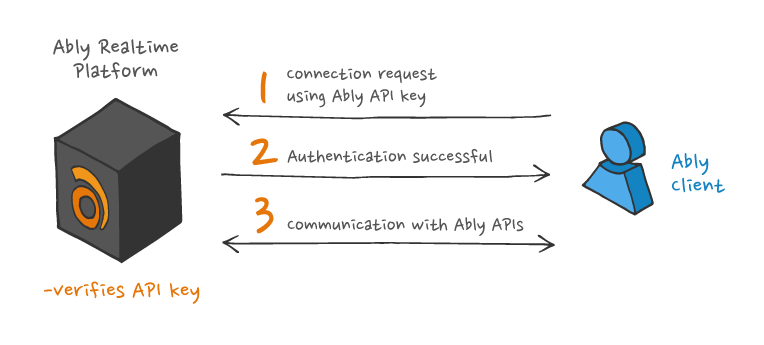
The process used by Ably SDKs to authenticate with Ably using basic authentication is illustrated in the following diagram:
## When to use basic auth
Ably recommends that basic authentication is only used server-side because of the following potential issues:
* The secret is passed directly by the client to Ably, so it is only permitted for connections that are over TLS, to prevent the key secret being intercepted.
* All of the configured [capabilities](https://ably.com/docs/auth/capabilities.md) of the key are implicitly possible in any request, and clients that legitimately obtain this key may then abuse the rights for that key.
* A client that authenticates using an API key can claim any client ID it chooses. Therefore this client ID cannot be trusted to represent the genuine identity of the client. Client IDs should be assigned by the server, once the client's credentials have been authenticated.
## Related Topics
- [Overview](https://ably.com/docs/auth.md): Ably supports two main authentication schemes: basic authentication and token authentication. Token authentication can be implemented using JWTs, Ably tokens, and Ably token requests.
- [Token revocation](https://ably.com/docs/auth/revocation.md): Token revocation is a mechanism that enables an app to invalidate authentication tokens.
- [Identified clients](https://ably.com/docs/auth/identified-clients.md): Clients can be allocated a client ID to help control their operations and interactions with Ably channels.
- [Capabilities](https://ably.com/docs/auth/capabilities.md): Capabilities define which operations can be carried out on which channels by a client.
## Documentation Index
To discover additional Ably documentation:
1. Fetch [llms.txt](https://ably.com/llms.txt) for the canonical list of available pages.
2. Identify relevant URLs from that index.
3. Fetch target pages as needed.
Avoid using assumed or outdated documentation paths.